Visa forms, online check-ins, and border applications often ask for your “travel document number.” Many people stop and wonder whether it is a separate code hidden somewhere in the booklet. It is not. This guide explains what the number is, where to find it, and how to enter it correctly so your forms are not rejected.
What Is a Travel Document Number?
When you travel with a passport, the travel document number is simply your passport number. “Travel document” is the general term, since it also covers refugee travel documents and other official papers. Forms use that wording so they work for everyone.
The number identifies one specific booklet. In most countries it changes when you renew, so a new passport usually means a new number.
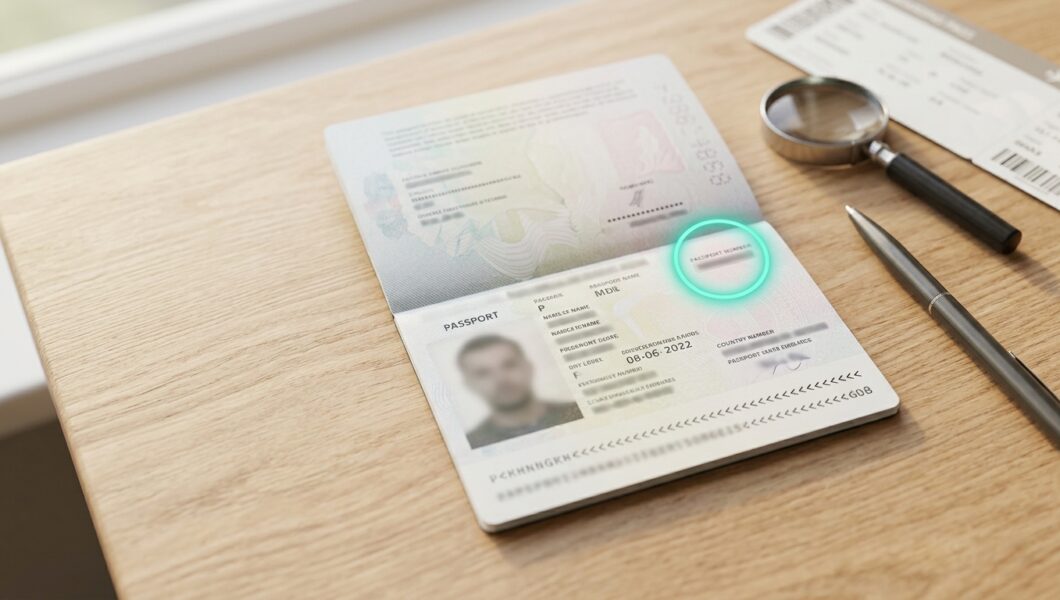
Know the Parts of the Data Page
Photo and personal details:
Your name, date of birth, and nationality appear next to your picture.
Document type and country code:
Small boxes show “P” for passport and a three-letter country code.
Passport number:
This is the travel document number, usually printed near the top right.
Dates:
Issue and expiry dates show how long the passport stays valid.
Machine readable zone (MRZ):
Two lines of letters, numbers, and “<” symbols run along the bottom edge.
Where to Find It
On most passports, the number sits on the photo page, labeled “Passport No.” or “Document No.” Many countries use nine characters, but length and format vary. Some are all digits, and others mix letters and digits.
The same number also appears in the MRZ. On a standard passport booklet, the first nine characters of the second MRZ line hold the document number. A check digit follows them, and “<” fillers pad shorter numbers. This is why scanners read your passport so quickly.
What You Need
- Your physical passport
- Good lighting or a flashlight for small print
- A magnifying glass or phone camera zoom (optional)
- The form or website asking for the number
- A pen and paper if you want to note it down privately
Step-by-Step: How to Find and Enter Your Travel Document Number
- Open your passport to the photo page
This is the data page with your picture and personal details. - Look at the top right
Find the field labeled “Passport No.” or “Document No.” Some countries place it elsewhere, so scan all the labeled boxes if needed. - Read it slowly
Say each character aloud. Letters and digits can look alike, such as O and 0, or I and 1. - Cross-check with the MRZ
Compare your number with the start of the second line at the bottom. They should match. - Ignore the check digit and fillers
Do not type the extra digit after the number or any “<” symbols. - Type it exactly as printed
Use capital letters, and skip spaces or dashes unless the form asks for them. - Review before submitting
Compare the typed entry with your passport once more. One wrong character can cause a delay or a rejected application. - Confirm the passport is current
Use the number from the passport you will actually travel with, not an expired one.
Passport Numbers vs. Other Numbers
| Number | What it is | Same as travel document number? |
| Passport number | Identifies your booklet | Yes |
| National ID number | Identifies you as a citizen | No |
| Visa number | Identifies a visa or permit | No |
| Application or file number | Tracks your passport application | No |
| Personal number (MRZ) | Optional national ID field | No |
| Passport card number | Identifies a separate card document | Only if the form asks for it |
Tips for Entering the Number Correctly
Copy what you see:
Do not rely on memory.
Match your booking:
Airline tickets, visas, and passports should all use the same details.
Check the validity window:
Many countries want at least six months of validity left.
Keep a private note:
Store a copy of the number securely in case your passport is lost.
Use the right document:
If you hold dual citizenship, enter the number for the passport you are using to enter that country.
Why Does the Number Matter?
Airlines use it to check you in and confirm you may board. Governments use it to issue visas and travel authorizations, such as electronic entry permits. Border officers use it to look up your records. Hotels in some countries ask for it at check-in too. Because so many systems rely on it, even a small typing error can create problems at the airport.
Common Mistakes to Avoid
Confusing O and 0:
Check the font and the MRZ to be sure.
Entering the national ID number:
It looks official, but it is a different number.
Including the check digit:
The extra digit after the number is not part of it.
Using an old passport number:
Renewed passports often have new numbers.
Adding spaces or symbols:
Many forms reject them.
Copying from a photo of unclear quality:
Blurry images lead to misread characters.
Safety Precautions
Your passport number is sensitive. Do not post photos of your passport on social media, even with parts covered, and avoid sending it over unsecured email or chat. Only enter it on official government sites or trusted airline and visa portals, and check the web address before typing. Be wary of messages asking for your passport number urgently, since these are often scams. If your passport is lost or stolen, report it to your country’s passport authority right away so the number can be cancelled.
Frequently Asked Questions
Is the travel document number the same as the passport number?
Yes. For a normal passport booklet, they are the same thing.
Where is it on my passport?
Usually at the top right of the photo page, and again at the start of the bottom MRZ line.
How many characters does it have?
Often nine, but this depends on the issuing country.
Does it change when I renew?
In most countries, yes.
Is it the same as the document type or file number?
No. The document type is a letter like “P,” and the file number only tracks your application.
The Bottom Line
The travel document number on a passport is simply your passport number. Look for it on the photo page, usually at the top right, and confirm it against the first nine characters of the second MRZ line. Type it exactly as printed, without the check digit or filler symbols, and use the number from the passport you will actually travel with. Keep it private, and always double-check it before submitting any form.